
都從 php.net 複制過來,只是記錄一下,
老了,常會忘掉,這樣下次就不用再查了





常常覺的Youtube上的影片有些還真有趣,
就會想要下載下來,以後無聊可以看看。
所以就研究了一下怎麼寫。
其實程式不難,短短的就可以搞定了。
下面就貼上我亂寫的一些Code。
第一種方式,是使用 get_video_info 來取得影片資訊,進而拿到token ,取得影片路徑。
function doHttpRequest($url) {
    $ch = curl_init();
    $header[] = "Cache-Control: no-cache";
    $header[] = "Pragma: no-cache";
    curl_setopt($ch, CURLOPT_HTTPHEADER, $header);
    curl_setopt($ch, CURLOPT_CONNECTTIMEOUT, 4);
    curl_setopt($ch, CURLOPT_TIMEOUT, 4);
    curl_setopt($ch, CURLOPT_URL, $url);
    curl_setopt($ch, CURLOPT_RETURNTRANSFER, 1);
    curl_setopt($ch, CURLOPT_FOLLOWLOCATION, true);
    curl_setopt($ch, CURLOPT_FAILONERROR, 1);

    $result = curl_exec($ch);
    curl_close($ch);
    return $result;
}

$url = 'http://www.youtube.com/watch?v=q_gfD3nvh-8';
// video_id
$key = explode("v=",$url);
$key = $key[1];

$content = doHttpRequest("http://youtube.com/get_video_info?video_id=".$key);

$a = explode('&', $content);
$info = array();
foreach($a as $item){
    $tmp = explode('=', $item);
    $info[$tmp[0]] = urldecode($tmp[1]);
}
$token = $info['token'];
$url= 'http://www.youtube.com/get_video?fmt=18\&video_id='.$key.'\&t='.$token;
$cmd = '/usr/bin/wget '.$url. ' -O /tmp/'.$key;

system($cmd, $ret_val);
echo $ret_val; // 回0表正常抓到檔案。
但第一種方式會有一個缺點,就是當影片有限制時,會有錯誤,例如回傳下列錯誤訊息。
array(3) { ["status"]=> string(4) "fail" ["errorcode"]=> string(3) "150" ["reason"]=> string(90) "這部影片含有 SM Entertainment 所擁有的內容,禁止在特定網站上播放。" }
所以這時候,可以改成用下列這種方式來抓影片,這個方式是直接把Youtube的播放頁Html全部抓回來,
然後取得所要的token及相關資訊,程式如下:
$url = 'http://www.youtube.com/watch?v=q_gfD3nvh-8';
// 取得 video id, 必要
$key = explode("v=",$url);
$key = $key[1];

$txt = urldecode(file_get_contents($url));
// 取得 title, 非必要
preg_match('/
$title = substr($title[0], 28, -2);
// 取得 keywords, 非必要
preg_match('/
$keywords = substr($keywords[0], 31, -2);
// 取得 token, 必要
preg_match('/&t=[\w-=_]+/',$txt,$t_temp);
$t = substr($t_temp[0], 3);

$url= 'http://www.youtube.com/get_video?fmt=18\&video_id='.$key.'\&t='.$t;
$cmd = '/usr/bin/wget '.$file. ' -O /tmp/'.$key;
system($cmd, $ret_val);
echo $ret_val; // 回0表正常抓到檔案。
所以基本上只要用第二種方式,就可以了抓到影片了。
不過我不太會regExp,所以寫的有點…暴力……
以上~~
附上 fmt 資訊 ( 來源:一次搞懂十種YouTube格式 )
※影片格式與&fmt參數對應
※&fmt參數與影片規格對照
| 參數 | 檔案格式 | 影片大小 | 聲音格式 | 備註 |
| &fmt=0 | FLV | 320 x 240 | 單聲道 22KHz MP3 | 與&fmt=5相同 |
| &fmt=5 | FLV | 320 x 240 | 單聲道 44KHz MP3 | |
| &fmt=6 | FLV | 480 x 360 | 單聲道 44KHz MP3 | |
| &fmt=34 | FLV | 320 x 240 | 雙聲道 44KHz MP3 | YouTube預設影片格式 |
| &fmt=35 | FLV | 640 x 380 | 雙聲道 44KHz MP3 | |
| &fmt=13 | 3GP | 176 x 144 | 雙聲道 8KHz | 適合小螢幕手機 |
| &fmt=17 | 3GP | 176 x 144 | 單聲道 22KHz | 適合小螢幕手機 |
| &fmt=18 | MP4 | 480 x 360 | 雙聲道 44KHz AAC | H.264編碼 |
| &fmt=22 | MP4 | 1280 x 720 | 雙聲道 44KHz AAC | H.264編碼 |
| &fmt=37 | MP4 | 1920 x 1080 | 雙聲道 44KHz AAC | H.264編碼 |
2010-08-05 更新:
不久前發現 http://www.youtube.com/get_video 這隻不能用了~
真的很麻煩,現在改成用 get_video_info 取得影片資訊,
然後 Parsing 裡面的 fmt_url_map ,取得各種格式的網址去下載。
今天同事問了一個問題
A.php 用 Curl 去抓 B.php 。
然後 B.php 寫在 Session 的東西,
為什麼 A.php 抓不到 (當然 B.php 也抓不到 A.php 的值),
這是因為 curl 其實產生了另一個 session,
所以就算存了也抓不到。
當然也有解決的方法,就是使用 session_id()
程式如下:
A.php
function doHttpRequest($url, $args='') {
    $ch = curl_init();
    //Post Data
    curl_setopt($ch, CURLOPT_POST, 1);
    curl_setopt($ch, CURLOPT_POSTFIELDS, 'sid='.session_id());

    curl_setopt($ch, CURLOPT_URL, $url);
    curl_setopt($ch, CURLOPT_RETURNTRANSFER, 1);
    $result = curl_exec($ch);
    curl_close($ch);
    return $result;
}

session_start();
$_SESSION['aa']='[A.php]';
session_write_close();

$url = 'http://cw.dev.com/B.php';
echo doHttpRequest($url);

session_id(session_id());
session_start();
var_dump($_SESSION);
B.php
session_id($_POST['sid']);
session_start();
$_SESSION['bb']='[B.php]';
var_dump($_SESSION);
執行結果:
array  'aa' => string '[A.php]' (length=7)  'bb' => string '[B.php]' (length=7)
array  'aa' => string '[A.php]' (length=7)  'bb' => string '[B.php]' (length=7)
以上,記錄一下…
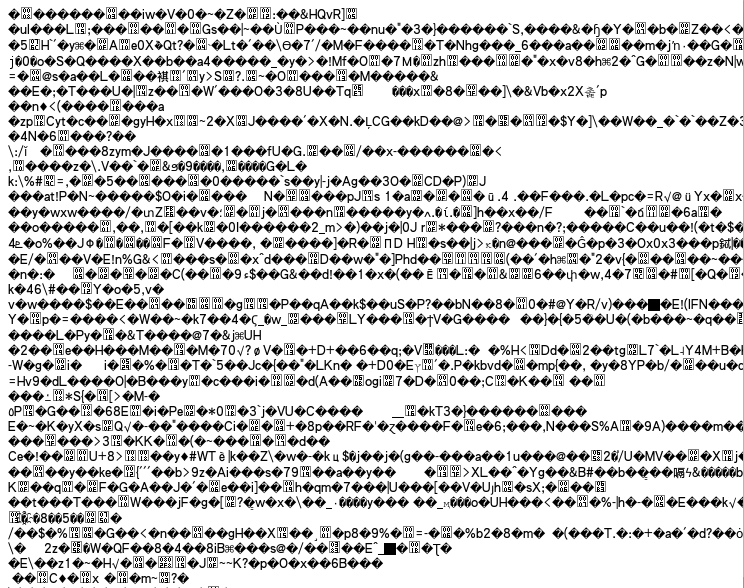
昨天同事說 js 用 php 的 gzencode 壓縮後,會變亂碼。
所以就看了一下。
程式如下:
    header('Content-type: text/javascript');
    header('Vary: Accept-Encoding');
    header('Expires: '.gmdate('D, d M Y H:i:s', time() + 3600).' GMT');
    header('Content-Encoding: gzip');

    $str = file_get_contents('js/_util/jquery-1.3.2.min.js');
    $str = gzencode($str);
    echo $str;
查了一下,原來是在 php.ini 就已經設定了 zlib.output_compression = On。
當設定了 zlib.output_compression = On 又在程式中使用 gzencode ,
這樣子,輸出就會變成亂碼了。
所以簡單的作法,就是【將程式中的 gzencode 拿掉】即可。
// $str = gzencode($str);
因為已經在 php.ini 設定好要 compression 了。
拿掉後,結果就正常了。

PS.
雖然 Lighttpd 中也有設定
compress.filetype = ("text/plain", "text/html", "text/css", "text/javascript" )
但這個是跟 Lighttpd 沒關系的,因為是從 PHP 去吐的。所以是跟 php.ini 設定檔有關。
在這裡做個記錄。
有時候,網頁都可以正常執行,但就是慢的想讓人吐血。
這時候就可以用 Xdebug 配合 KCachegrind 來看看,到底是慢在那裡。
首先,要裝好 Xdebug ,並且在 php.ini 中,設定啟用。
1. 安裝 Xdebug
# tar zxvf xdebug-2.0.2.gz
# cd xdebug-2.0.2
# ./configure --enable-xdebug --with-php-config=/home/php/bin/php-config
# make
# make install
2. 在 Ubuntu 下安裝 KCachegrind
# sudo apt-get install KCachegrind
3. 在 php.ini 中設定啟用
[xdebug]
zend_extension="/home/php/lib/php/extensions/no-debug-non-zts-20060613/xdebug.so"
xdebug.profiler_enable=off
xdebug.profiler_enable=on
xdebug.trace_output_dir="/tmp/xdebug"
xdebug.profiler_output_dir="/tmp/xdebug"
4. 接著只要執行網頁就會在 /tmp/xdebug 下產生 cachegrind.out.xxxxx
注意:要測試時,要請其它人都不要執行,某則很難知道那個cachegrind.out 檔是你要的。
5. 接著把 cachegrind.out 檔抓回來,使用 KCachegrind 來查看結果。
載入 cachegrind.out.xxxxx

就可以看到如下圖般詳細的資訊,由其是 Call Graph 的資訊,真是超詳細的。
PS. 記得上線後要把 php.ini 裡的 Xdebug Mark 起來,不然上線會變很慢。
以上,簡單記錄一下。
一直不想寫很複雜的SQL,但最終還是會遇到~~唉~~
這次的需求就是要從 A Table 中取得 ID。
再從 B Table 中,依 A.ID 與 B.AID 做對應,查出資料。
這部份就用到 Sub Query
附上我的程式範列:
# 程式在 A Model
# 先從 A Model 查出需要的 ID
$tbSelect1 = $this->getTable()->select()
        ->from($this->getTable(),
            array('COUNT(*) AS CNT', 'AID'))
        ->order('CNT DESC')
        ->group('AID')
        ;

# 再跟 B Table 做 Join
$tbSelect2 = $this->getTable()->select()
        ->setIntegrityCheck(false)
        ->from(array('T' => $tbSelect1),
            array('T.AID')
            )
        ->where("T.CNT > 10")
        ->joinLeft('B',
            'T.AID = B.AID',
            array('B.TITLE', 'B.NAME'))
        ;

$res = $this->getTable()->fetchAll($tbSelect2)->toArray();
上面這程式最後產生出來的 SQL 為
SELECT "T"."AID", "B"."TITLE", "B"."NAME" FROM (
SELECT COUNT(*) AS "CNT", "A"."MEDIA_ID"
FROM "A" GROUP BY "AID" ORDER BY "CNT" DESC
) "T"
LEFT JOIN "B" ON T.ID = B.AID
然後還有另一種方式,是使用 IN 的方式。
# 程式在 A Model
# 先從 A Model 查出需要的 ID
$tbSelect1 = $this->getTable()->select()
        ->from($this->getTable(),
            array( 'AID'))
        ->group('AID')
        ;

# 利用 IN 取得所需資料
$tbSelect2 = $this->getTable()->select()
        ->setIntegrityCheck(false)
        ->from('B'
            ,array('B.TITLE', 'B.NAME')
            )
        ->where(new Zend_Db_Expr("B.AID IN (". $tbSelect1." )"))
        ;
上面這段程式產生的 SQL 為
SELECT "B"."TITLE", "B"."NAME"
FROM "B"
WHERE (B.AID IN (
SELECT "A"."MEDIA_ID" FROM "A" GROUP BY "AID"
))
就效能來看,目前好像是 第一種 Left Join 比較好。
但因為資料量少,也還沒辦法確定。待查~~
